If you try to update eclipse or any eclipse based product (f.e. RAD) and it takes 2 hours to display first update window... you probably are in a big company, behind the proxy, and with local DNS servers that do not know anything about internet.
Please call your network administrator and tell him to configure DNS to answer server failed, and not to pretend to not exist... cause Update Manager contacts eclipse update sites *before* displaying the first update window... and it does it a lot of times. Default timeout for DNS query is about half a minute...
And now good news: new update manager will be shipped with Eclipse 3.4 (next summer).
Cheers!
Thursday, August 23, 2007

Tuesday, August 7, 2007
Eclipse data binding with java beans
I’ve been thinking about how to provide easiest tutorial on data binding allowing you to go through all steps smoothly. I was thinking and coding and it is a little bit more complex than I planned ;)
Since code was ready couple of things has changed so I need to check if all dependencies in this project are needed. I’ll will show you a standalone application example but to make things easier (in my opinion) let me start from plug-in project. This will allow us (if we are building on Eclipse 3.3) to add all needed libraries from our Eclipse distribution.
This will be example of bidirectional synchronization between Java Bean and simple form which presents bean’s content. So let’s start.
Build java bean class.
This can be something simple (I will take a Address class with two fields street and city)
Defining an user interface
To build a screen in an automatic way we will use java.beans.Introspector. But let start from beginning. We must add dependencies to JFace library to our build path. As our project is plug-in project it can be done as adding dependency to JFace.
To build fields for our bean’s properties we can use following code fragment:
BeanInfo beanInfo = null;
  try {
   beanInfo = Introspector.getBeanInfo(bean.getClass());
  } catch (IntrospectionException e) {
   e.printStackTrace();
   return;
  }
  PropertyDescriptor[] propertyDescriptors = beanInfo.getPropertyDescriptors();
  for (PropertyDescriptor descriptor : propertyDescriptors) {
   if("class".equals(descriptor.getName())) continue;
   Label label = new Label(shell, SWT.NONE);
   label.setText(descriptor.getName());
   Text t = new Text(shell, SWT.BORDER);
//here will be data binding added
  }
Rest of source code can be found in attached project file. After running application (as Java application) this should look very similar to :
Adding data binding (from UI to bean)
Now there is a high time to add data binding to our simple application.
Add core binding, jface and bean bindings (org.eclipse.core.databinding, org.eclipse.core.databinding.beans, org.eclipse.jface.databinding). This will allow us to connect Text components with its data model (which is our address bean).
We need to create binding context and realm:
Realm realm = SWTObservables.getRealm(shell.getDisplay());
DataBindingContext bindingContext = new DataBindingContext(realm);
Using bindContext we are able to connect our text components with data:
 private void bindValue(DataBindingContext context, Text text, String name) {
  IObservableValue observeValue = BeansObservables.observeValue(context.getValidationRealm(), bean, name);
  ISWTObservableValue observeText = SWTObservables.observeText(text, SWT.Modify);
  context.bindValue(observeText, observeValue, null, null);
 }
But when we try to run this application you will get a unresolved dependencies (NoClassDeffinitionFound exception). We need to add additional dependencies to our project (org.eclipse.core.runtime).
If you followed this article you should get something similar to:
We have one another feature for free now. If you change name of the street or city this changes from our simple windows are applied to data object. Let’s try to add opposite direction data shifting.
Adding data binding (from bean to UI)
To make our data object to be source of changes we must implement basic property change support.
abstract class AbstractModelObject {
 public void addPropertyChangeListener(PropertyChangeListener listener);
 public void addPropertyChangeListener(String propertyName,
   PropertyChangeListener listener);
 public void removePropertyChangeListener(PropertyChangeListener listener);
 public void removePropertyChangeListener(String propertyName,
   PropertyChangeListener listener);
 protected void firePropertyChange(String propertyName, Object oldValue,
   Object newValue);
}
And let our AddressBean class extends AbstractModelObject. The only think we must remember is to add firePropertyChange for each set method.
One again we win twice. First of all we can add change listener to our data object. Second we have bidirectional data synchronization between our graphic and data component.
Fun, fun, fun
The only last step to show power of data binding is adding a thread which will update data object. All this changes are visible in our simple control.
Adding other type of field is a piece of cake. First we need com.ibm.icu in our dependencies. Second adding field of other type (e.g. int or data).
Hope this article will help you to start your journey through Eclipse data binding features. Article source code can be found here
The final result is following:
Monday, August 6, 2007
Eclipse and Proxy Settings
There is nothing more irritating that eclipse update manager (There is new one coming, I know, I know).
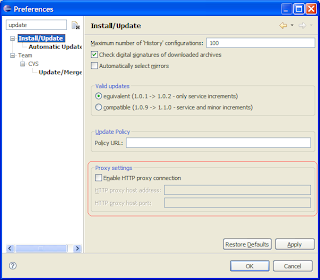
In Eclipse Callisto (3.2) proxy settings
were integrated into general eclipse network preferences in Europa (3.3):
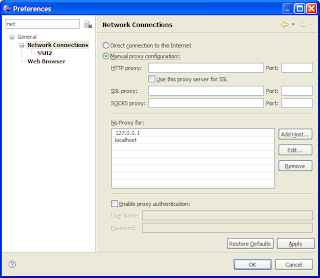
As you see it solves many problems: now you can use update manager even if you have ssl authentication server and you do not need to enter your security credentials every time...
But please imagine you have much more complicated situation: your product on internal update site and you have proxy server that isolates your company network from internet and you rely on eclipse community projects...
Now it is pain!
In this situation eclipse should have set:
You can achieve your goal adding internal update server host name, server http address (but without http:// and IP address...). It means there are 3 entries per one server.
Then it will work.
In Eclipse Callisto (3.2) proxy settings

were integrated into general eclipse network preferences in Europa (3.3):

As you see it solves many problems: now you can use update manager even if you have ssl authentication server and you do not need to enter your security credentials every time...
But please imagine you have much more complicated situation: your product on internal update site and you have proxy server that isolates your company network from internet and you rely on eclipse community projects...
Now it is pain!
In this situation eclipse should have set:
- Proxy Settings for your proxy server
- Internal update site in No Proxy for.
You can achieve your goal adding internal update server host name, server http address (but without http:// and IP address...). It means there are 3 entries per one server.
Then it will work.
Database server is down
It is amazing how much my work relies on one database.
For more than two hours I see this message:
(Can't contact the database server: Too many connections (dbmaster))
I don't have access to bugzilla to wiki, I cannot even download eclipse distros.
Do you think I should take day off ? ;)
Instead I will work on data binding tutorial (Yes I know that taking day off is better idea ;)
For more than two hours I see this message:
(Can't contact the database server: Too many connections (dbmaster))
I don't have access to bugzilla to wiki, I cannot even download eclipse distros.
Do you think I should take day off ? ;)
Instead I will work on data binding tutorial (Yes I know that taking day off is better idea ;)
Thursday, July 26, 2007
paste'n'run
JDT team is not stopping in their efforts to save our input devices so now getting working project from a snippet posted somewhere on web or newsgroup is about 13 clicks faster!
(I don't see the movie)
(I don't see the movie)
Friday, July 20, 2007
Compare folders on Windows
Yesterday I had two Eclipses that one worked and other didn't, it was obvious to make some diff but real pain that I had nothing like diff, cmp or compare under Windows.
But hey, Eclipse compares folders all the same as it compares our Java code.
You simply create new project, create two new linked folders, that point to somewhere in your filesystem, select, "Compare -> With Each Other" from popup and voila

But hey, Eclipse compares folders all the same as it compares our Java code.
You simply create new project, create two new linked folders, that point to somewhere in your filesystem, select, "Compare -> With Each Other" from popup and voila

Friday, July 6, 2007
How to deal with many Eclipses
Sometimes you are not only a Java, C++, Python, Ruby or web programmer. There are days when you need to deal with many technologies. And even if you are only a Java developer – remember we are in Eclipse Europe age. This means many great tools but also huge plugins set. If you are lucky then probably you will newer suffer from memory shortages or Windows Vista behavior in your Eclipse.
I want to tell you about nothing newest and noteworthy but something old and forgotten (especially at my university).
At first I will tell you how does it look now. If you need only Java you download fast and furious Eclipse from eclipse.org. But after that you needs some testing, code coverage, debugging and profiling. So EMF, TPTP flies to your plugin folder. After some time simple web application is needed – WTP. And so on and so on. Oh, I’ve forgot about Mylyn – we are task oriented ;). But with every minute (and with a workspace size) our Eclipse is slower and more space consuming.
Till today I had four Eclipses. One for C/C++ developing one for web, plugins and Java one for profiling and one for experiments ;).
But there is an option how to reuse one eclipse installation - -configuration switch. This is my solution:

Download each feature to separate location.
Choose needed features from update site. You can specify location for each feature separately.
Add locations to your product configuration
This should be already done if you followed last paragraph. But something could happen between lines. So lets assume you have only one site with CDT but you also need Mylyn.


Above is my product configuration. One this you can do is disabling the specific feature location. So if you want remove some functions temporary from your Eclipse this is option for you. To add new location use view menu
Clone product configurations
This is very easy step and can be done in two ways.
First – copy configuration dir to different location.
Second – use eclipse –initialize – configuration
Modify it to your needs
To deal with different set of features one file is needed
<?xml version="1.0" encoding="UTF-8"?>
<config date="1183550870687" transient="false" version="3.0">
<site enabled="true" policy="USER-EXCLUDE" updateable="true" url="file:../plugins/mylyn/eclipse/">
<feature id="org.eclipse.mylyn.java_feature" plugin-identifier="org.eclipse.mylyn" url="features/org.eclipse.mylyn.java_feature_2.0.0.v20070628-1000/" version="2.0.0.v20070628-1000">
…
</site>
<site enabled="true" policy="USER-EXCLUDE" updateable="true" url="platform:/base/">
</site>
<site enabled="true" policy="USER-EXCLUDE" updateable="true" url="file:../plugins/cdt/eclipse/">
<feature id="org.eclipse.cdt" url="features/org.eclipse.cdt_4.0.0.200706261300/" version="4.0.0.200706261300">
</feature>
</site>
</config>
You have many (in this example two ;) ) with different features. So if you need configuration for Java + profiling you choose TPTP and basic site.
That’s all now you need to start your Eclipse with suitable parameter.
It is even more useful if you work in team. Then only thing you need is to put all features to network drive. Additional advantage is that all developers have almost the same Eclipse configuration.
Hope it helps ;)
Subscribe to:
Posts (Atom)
