Our Eclipse Summer School 2007 (weekly Eclipse training in Poznań - Poland) has just finished. We have invited mostly students, but there were also representatives of industry - some companies. Together we had 34 participants from the whole Poland!
The training took 6 days, 8 hours/day (the participants and presenters were very brave to complete it) and we managed to cover most interesting parts of Eclipse: Eclipse as an IDE, Plugin Architecture, SWT/JFace, EMF, Views, Perspectives, Editors, RCP, GMF, BIRT.
We are proud to announce, that the feedback was very positive! The average overall experience was 4.96 (very good, in 1-6 scale) and 100% of the participants would recommend our training to their colleagues.
I hope this feedback is so high, not only because Alicja (one of our presenters) has great freckles and male participants have fallen in love with her ;-)
Eclipse Summer School 2007 website is at: www.eclipsesummerschool.com - you can see pictures from the event and download the slides (in Polish only).
Saturday, September 29, 2007

Tuesday, September 25, 2007
catchy questions
Eclipse training, like we have this week in Poland, it's always great opportunity to learn new things, as students have lots of stimulating questions, that you'd never ask yourself :)
So today morning we were debugging JUnit tests and got caught by "Why Drop To Frame is inactive?".
Luckly, Darin Wright already answered to this question some time ago on bugzilla:
"the Java debugger supports the operation when
debugging on a VM that supports it (1.4.x or higher), and there are no native
methods on the call stack above the point you want to drop to."
That was the hit, as we had JUnit native methods on the stack.
So today morning we were debugging JUnit tests and got caught by "Why Drop To Frame is inactive?".
Luckly, Darin Wright already answered to this question some time ago on bugzilla:
"the Java debugger supports the operation when
debugging on a VM that supports it (1.4.x or higher), and there are no native
methods on the call stack above the point you want to drop to."
That was the hit, as we had JUnit native methods on the stack.
Monday, September 17, 2007
Nice GMF video for newcomers
While I was trying to find an answer for some question on the newsgroup I came across nice GMF video. You can find it HERE. I'm not sure if it is linked anywhere on the GMF website, so I post it here as it can be very useful for people, who start playing with GMF.
Thursday, September 13, 2007
Programmer day
Best wishes for programmers day to whole Eclipse Community :D
http://www.teachersparadise.com/ency/en/wikipedia/p/pr/programmer_s_day.html
http://www.teachersparadise.com/ency/en/wikipedia/p/pr/programmer_s_day.html
Thursday, August 23, 2007
Enormously long eclipse update
If you try to update eclipse or any eclipse based product (f.e. RAD) and it takes 2 hours to display first update window... you probably are in a big company, behind the proxy, and with local DNS servers that do not know anything about internet.
Please call your network administrator and tell him to configure DNS to answer server failed, and not to pretend to not exist... cause Update Manager contacts eclipse update sites *before* displaying the first update window... and it does it a lot of times. Default timeout for DNS query is about half a minute...
And now good news: new update manager will be shipped with Eclipse 3.4 (next summer).
Cheers!
Please call your network administrator and tell him to configure DNS to answer server failed, and not to pretend to not exist... cause Update Manager contacts eclipse update sites *before* displaying the first update window... and it does it a lot of times. Default timeout for DNS query is about half a minute...
And now good news: new update manager will be shipped with Eclipse 3.4 (next summer).
Cheers!
Tuesday, August 7, 2007
Eclipse data binding with java beans
I’ve been thinking about how to provide easiest tutorial on data binding allowing you to go through all steps smoothly. I was thinking and coding and it is a little bit more complex than I planned ;)
Since code was ready couple of things has changed so I need to check if all dependencies in this project are needed. I’ll will show you a standalone application example but to make things easier (in my opinion) let me start from plug-in project. This will allow us (if we are building on Eclipse 3.3) to add all needed libraries from our Eclipse distribution.
This will be example of bidirectional synchronization between Java Bean and simple form which presents bean’s content. So let’s start.
Build java bean class.
This can be something simple (I will take a Address class with two fields street and city)
Defining an user interface
To build a screen in an automatic way we will use java.beans.Introspector. But let start from beginning. We must add dependencies to JFace library to our build path. As our project is plug-in project it can be done as adding dependency to JFace.
To build fields for our bean’s properties we can use following code fragment:
BeanInfo beanInfo = null;
  try {
   beanInfo = Introspector.getBeanInfo(bean.getClass());
  } catch (IntrospectionException e) {
   e.printStackTrace();
   return;
  }
  PropertyDescriptor[] propertyDescriptors = beanInfo.getPropertyDescriptors();
  for (PropertyDescriptor descriptor : propertyDescriptors) {
   if("class".equals(descriptor.getName())) continue;
   Label label = new Label(shell, SWT.NONE);
   label.setText(descriptor.getName());
   Text t = new Text(shell, SWT.BORDER);
//here will be data binding added
  }
Rest of source code can be found in attached project file. After running application (as Java application) this should look very similar to :
Adding data binding (from UI to bean)
Now there is a high time to add data binding to our simple application.
Add core binding, jface and bean bindings (org.eclipse.core.databinding, org.eclipse.core.databinding.beans, org.eclipse.jface.databinding). This will allow us to connect Text components with its data model (which is our address bean).
We need to create binding context and realm:
Realm realm = SWTObservables.getRealm(shell.getDisplay());
DataBindingContext bindingContext = new DataBindingContext(realm);
Using bindContext we are able to connect our text components with data:
 private void bindValue(DataBindingContext context, Text text, String name) {
  IObservableValue observeValue = BeansObservables.observeValue(context.getValidationRealm(), bean, name);
  ISWTObservableValue observeText = SWTObservables.observeText(text, SWT.Modify);
  context.bindValue(observeText, observeValue, null, null);
 }
But when we try to run this application you will get a unresolved dependencies (NoClassDeffinitionFound exception). We need to add additional dependencies to our project (org.eclipse.core.runtime).
If you followed this article you should get something similar to:
We have one another feature for free now. If you change name of the street or city this changes from our simple windows are applied to data object. Let’s try to add opposite direction data shifting.
Adding data binding (from bean to UI)
To make our data object to be source of changes we must implement basic property change support.
abstract class AbstractModelObject {
 public void addPropertyChangeListener(PropertyChangeListener listener);
 public void addPropertyChangeListener(String propertyName,
   PropertyChangeListener listener);
 public void removePropertyChangeListener(PropertyChangeListener listener);
 public void removePropertyChangeListener(String propertyName,
   PropertyChangeListener listener);
 protected void firePropertyChange(String propertyName, Object oldValue,
   Object newValue);
}
And let our AddressBean class extends AbstractModelObject. The only think we must remember is to add firePropertyChange for each set method.
One again we win twice. First of all we can add change listener to our data object. Second we have bidirectional data synchronization between our graphic and data component.
Fun, fun, fun
The only last step to show power of data binding is adding a thread which will update data object. All this changes are visible in our simple control.
Adding other type of field is a piece of cake. First we need com.ibm.icu in our dependencies. Second adding field of other type (e.g. int or data).
Hope this article will help you to start your journey through Eclipse data binding features. Article source code can be found here
The final result is following:
Monday, August 6, 2007
Eclipse and Proxy Settings
There is nothing more irritating that eclipse update manager (There is new one coming, I know, I know).
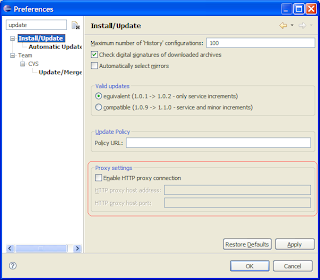
In Eclipse Callisto (3.2) proxy settings
were integrated into general eclipse network preferences in Europa (3.3):
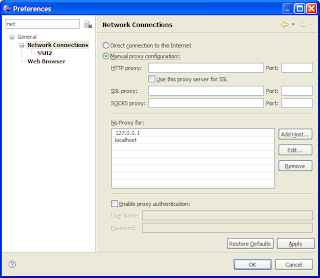
As you see it solves many problems: now you can use update manager even if you have ssl authentication server and you do not need to enter your security credentials every time...
But please imagine you have much more complicated situation: your product on internal update site and you have proxy server that isolates your company network from internet and you rely on eclipse community projects...
Now it is pain!
In this situation eclipse should have set:
You can achieve your goal adding internal update server host name, server http address (but without http:// and IP address...). It means there are 3 entries per one server.
Then it will work.
In Eclipse Callisto (3.2) proxy settings

were integrated into general eclipse network preferences in Europa (3.3):

As you see it solves many problems: now you can use update manager even if you have ssl authentication server and you do not need to enter your security credentials every time...
But please imagine you have much more complicated situation: your product on internal update site and you have proxy server that isolates your company network from internet and you rely on eclipse community projects...
Now it is pain!
In this situation eclipse should have set:
- Proxy Settings for your proxy server
- Internal update site in No Proxy for.
You can achieve your goal adding internal update server host name, server http address (but without http:// and IP address...). It means there are 3 entries per one server.
Then it will work.
Subscribe to:
Posts (Atom)
