Wednesday, October 1, 2014

Workspace unsaved changes mystery demystified

Are you an Eclipse plug-in developer and you have seen at least once a warning saying something about unsaved changes in the previous session like the one below?


Well, I bet you did, although you probably never paid attention to it since the warning is quite harmless, although can be very annoying. Let me explain why...

The warning is generated during Eclipse startup if your workspace was not properly saved during the previous session. Not properly saved means that something bad happened like process crash, blue screen, power down, etc., and normally you would lost your work. However, Eclipse is able to detect this situation and recover. Not a very fancy recovery, but it does the job and so the warning message is very informative because it's good to know that Eclipse just recovered your work behind the scenes. So far so good.

The annoying part is that it can happen even if you are 100% sure that you closed your Eclipse the right way without any crash and all looked good when you closed it the last time. So, why Eclipse tries to recover something if there is should be nothing to recover?

The answer is that in most cases you didn't do anything wrong and the unsaved change was generated by some badly written plug-in that modified your workspace after you already asked Eclipse to shut down. If you are a curious person like I am, you will probably ask "Fine, but which of the plug-ins is the bad one?" Well, easier said than done. Especially because it happens during shutdown and you will be warned there was some unsaved change during next Eclipse startup. This is a bit too late...

The warning became so annoying that I decided to spend some time to adjust the workspace save behaviour so that we can distinguish unsaved change caused by power down from the one caused by a badly written plug-in and then find out in a semi-automatic way which plug-in is the culprit. Since Eclipse SDK 4.5 build-id I20140930-0800 additional error message will be logged if there is any code that tries to modify your workspace after you already asked Eclipse to stop. Here is an example:


!ENTRY org.eclipse.core.resources 4 10035 2014-09-30 17:27:37.511
!MESSAGE The workspace will exit with unsaved changes in this session. Snapshot requestor: org.eclipse.core.internal.events.NotificationManager$NotifyJob(Updating workspace)
!STACK 0
java.lang.RuntimeException: Scheduling workspace snapshot
 at org.eclipse.core.internal.resources.SaveManager.rememberSnapshotRequestor(SaveManager.java:553)
 at org.eclipse.core.internal.resources.SaveManager.snapshotIfNeeded(SaveManager.java:1476)
 at org.eclipse.core.internal.resources.Workspace.endOperation(Workspace.java:1499)
 at org.eclipse.core.internal.resources.Workspace.run(Workspace.java:2321)
 at org.eclipse.core.internal.events.NotificationManager$NotifyJob.run(NotificationManager.java:41)
 at org.eclipse.core.internal.jobs.Worker.run(Worker.java:55)

If you have auto-build enabled, in most cases the error will mention one of these classes:

org.eclipse.core.internal.events.AutoBuildJob
org.eclipse.core.internal.events.NotificationManager.NotifyJob

This is the code that requested additional workspace save after you manually asked Eclipse to stop but in reality, this is not the problematic part of the code. So, how can you tell which workspace operation triggered an auto-build which in turn requested additional workspace save? Here is where the "semi-" part of the solution plays a role.

Whenever you see an error saying that The workspace will exit with unsaved changes in this session., you already know that some plug-in modified your workspace without your knowledge after you asked Eclipse to stop. In order to find this plug-in you need to enable a few debug options including the new debug option for resource change notifications and then capture the console output to a file.

In the case I investigated, here is what I did:

1. Add -consoleLog to your eclipse.ini file.
2. Run Eclipse using the following command:

eclipsec.exe >> trace.txt 2>&1
3. Go to Window > Preferences > General > Tracing preference page.
4. Enable the Enable tracing option.
5. Expand the Platform Core Resources node and enable the following options:
org.eclipse.core.resources/build/delta=true
org.eclipse.core.resources/build/failure=true
org.eclipse.core.resources/build/interrupt=true
org.eclipse.core.resources/build/invoking=true
org.eclipse.core.resources/build/needbuild=true
org.eclipse.core.resources/build/needbuildstack=true
org.eclipse.core.resources/build/stacktrace=true
org.eclipse.core.resources/debug=true
org.eclipse.core.resources/notifications=true
org.eclipse.core.resources/save=true
Not all of them are strictly necessary, but since you don't want to do this more than once, it's better to gather all the data at first attempt.
6. Start using your Eclipse normally and observe the Error Log view. If you see "The workspace will exit with unsaved changes in this session." error followed by "The workspace exited with unsaved changes in the previous session;..." warning, it is time to look at the trace.txt file.

The relevant part of the trace file is between the line that says:

Tue Sep 30 17:27:34 CEST 2014 - [ModalContext] org.eclipse.core.internal.jobs.ThreadJob(Implicit Job): Full save on workspace:  starting...
and the first line that contains
java.lang.RuntimeException: Scheduling workspace snapshot

Any resource change event that happened between this two lines could be the culprit of unsaved changes so now you need to read the trace file and see which event is suspicious. In my example, it was quite easy because the following event was generated after every full save on workspace:

Type: POST_CHANGE
Build kind: 0
Resource: null
Delta:
/[*]: {}
/External Plug-in Libraries[*]: {}
/External Plug-in Libraries/.searchable[*]: {CONTENT}

What it means is that whenever I ask Eclipse to stop, some plug-in modifies the content of /External Plug-in Libraries/.searchable file as part of the save operation. This results in subsequent resource change events being populated and triggering auto-build and in the end workspace snapshot which will give the unexpected change warning during next startup. Having all this data, the only thing that is left is to find out which plug-in is responsible for /External Plug-in Libraries/.searchable and then fix it.

If you want to see an example how the whole investigation was done in practice, take a look at bug 444988 where one of the problematic plug-ins was identified and will be fixed in the near future hopefully.

Happy hunting! :)

Friday, June 28, 2013

Summary after DemoCamp in Poznan

Eclipse DemoCamp in Poznan is over. It went great and a lot of people showed up. We had 55 people registered from which 44 showed up during the event. Fortunately, the local was big enough to hold everyone. Presentations were very interesting, although after the survey we sent to participants it turned out that those with an actual live demo were more attractive.

Here are some photos of our DemoCamp:

If you want to join us and present something in November, let me know.

See you in November!
Szymon

Wednesday, June 5, 2013

Eclipse DemoCamp in Poznan is coming

The next version of one of the most popular IDEs is almost done. Get ready to be the first to see what's new in it! Join our Eclipse DemoCamp in Poznan and find out!

The event will be hosted at The Brothers Pub on Wednesday, June 12 at 6:30 PM. You can find more information about the event on our wiki page.

If you want to join us, please register, so that we can make sure you can get beer and pizza when you come. And hurry up, because there are not many seats left!

See you there!
Szymon

Tuesday, March 20, 2012

'Ignore optional compile problems' is now available with 3.8/4.2 M6


  • Have you ever been overwhelmed by thousands of potentially unimportant warnings in your Java project?
  • Have you ever tried to avoid excessive error reporting from a source folder containing auto-generated code?
  • Have you ever looked for a specific problem and could not find it because it drowned somewhere in the Problems view?


If answer to any of the above questions is 'Yes', then I have good news for you! Finally, after several busy weeks, we have an option to ignore all configurable compile problems just a few clicks away!

It's really simple!


You can turn on the new Ignore optional compile problems option for each source folder available in your Java project. To do that, go to Project properties > Java Build Path > Source and toggle the value of 'Ignore optional compile problems' to Yes. With this option set to 'Yes', JDT compiler will suppress errors and warnings configured in the Preferences > Java > Compiler > Errors/Warnings page.


Java Build path page with 'Ignore optional compile problems' highlighted


We wouldn't have the new option without great help from Satyam and Markus who spent a lof of time reviewing patches for bug 220928. Thanks guys!


For other noteworthy things available in 3.8/4.2 M6 see the entire New and Noteworthy.

Tuesday, November 29, 2011

Time to say goodbye!

I think I should start this writing from stating that this is a guest post, as I am no longer a member of IBM Eclipse Support crew.

It has been almost 5 entire years since my office was formed as a kind of joint venture between Poznan University of Technology and IBM. My main responsibility was to help customers with their Eclipse related problems. As you know, many IBM Rational products are Eclipse based, even those server-side, so I never had enough time to blog or actively participate in Eclipse development - I barely managed to open a number of bugs that could change how corporations perceived Eclipse and Eclipse-based solutions.

I'd say that my experience gathered on the border of open-source and enterprise worlds is a rather unique one. And I would like to share it with you at EclipseCon.

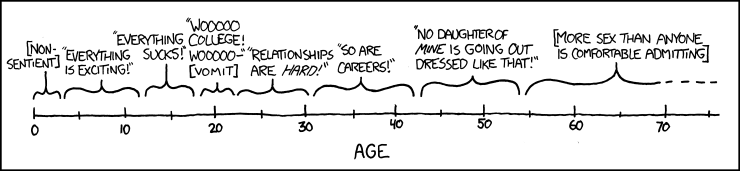
I guess that my 5 years of work for IBM may be summarized with the following xkcd strip - I just started realizing that careers are hard ;-).
Every age: "I'm glad I'm not the clueless person I was five years ago, but now I don't want to get any older."
If you wonder what I will do next, please stay tuned! I will announce that on my newly created blog once it gets added to the planet Eclipse (I have already opened a bug for that).

I would like to publicly say "Thank you" to Daniel Megert for his incredibly reliable work, not only in JDT - and nominate him to Eclipse Community Awards in recognition.

Thank you for reading this post :). I hope that I will have now much more time for writing.

Krzysztof (Chris) Daniel

Monday, May 30, 2011

A very interesting bug report

One image is worth more than a thousand of words.
Just check this real bug report:

Thursday, April 28, 2011

New preferences for Eclipse

Hello All!
As you probably have noticed, Eclipse preferences are not perfect. A majority of enterprise companies struggle with enforcing consistent setttings across multiple installations, and so far nobody find a remedy which would be good enough.

Recently a light appeared in the tunnel. Ericcson contributed code for obtaining preferences from a certain URL, something similar to the Workspace Mechanic, which may solve some of the enterprise problems.

On the other hand, two GSoC proposals have been accepted in the area of preferences. I would like to get it done right this time, so any comments/suggestions are welcome.

Monday, February 28, 2011

New preferences for Eclipse

This is just a small update to let you know that Eclipse preferences which I have described in my last post are hosted in Eclipse labs here together with usage description.

Monday, February 21, 2011

New preferences for Eclipse

It has been long time since I recently blogged on Planet Eclipse, but as an Eclipse Support Center we have been incredibly busy during the recent year. Last time I have mentioned preferences issues that are pretty often reported and left without a fix, because of Equinox preference limitations.
We had no other choice to solve customer woes than to start a closer cooperation with Poznan University of Technology, and a group of excellent students, as a part of their thesis, analysed, designed and coded a separate preferences module, which addresses (almost) all issues in "old" preferences that we have been aware off.

Check out their webcast - it is definitely worth it (for some reason the video does not get displayed on Planet Eclipse, you have to refer to the original blog entry or directly to Youtube).


The project was started in Eclipse labs, but we would like to move it to incubator. Could any of full time commiters guide us through the process of code donation? Any help will be deeply appreciated.

The code itself requires further work, like adding proper licensing headers, project naming issues, etc. I expect the code will be ready for reviews and donations before the end of month.

Those excellent students that did that thing are:
Marek Kuzora
Anna Ferster
Filip Wisniewski (responsible for the editor)

Congratulations!

Note: Poznan University of Technology has more excellent students which would like to get experience in commercial environment (and write their thesis, too). So if you have any non-business-critical project (or research project) to realize, please drop me a line (krzysztof.daniel somewhere at pl.ibm.com), and I will contact you with appropriate person.

Monday, June 21, 2010

Eclipse preferences

As you may remember from my earlier postings, on of conditions on which you can get your degree at Poznan University of Technology is taking part in so call Software Development Studio course. Participating students learn how it is like to write a software in real project, where are deadlines, quite a big team, changing requirements, real communication problems, etc. It is the first real experience of students with business world.

Google has recently created their workspace mechanic, which addresses the most common problem that big adopters of Eclipse has - preferences management in corporate environments. I am very happy that someone has finally noticed this problem.

However, I am not happy with installing 3rd party software to manage all the preferences. More, I do not believe it is a correct way. Eclipse, as a great platform, should offer such a functionality without the need of installing non-Eclipse plugins.

That's why I am supervising the project called 'Extended Preferences'. It is at very early stage, we are not sure if it will be welcome by Eclipse Foundation, but if you have some specific requirement which you think we should implement, just let us know.

For now, we would like to satisfy following requirements:
  • ability to define during the development, which preferences can be exported
  • ability to define import strategy (override, merge or reset)
  • ability to create a set of preferences to distribute them amongst developers
  • ability to promote project preferences to workspace preferences
  • support preferences which can be shared across workspaces
  • help developers to use preferences correctly (implement change listeners!)
  • create migration tool

We are not sure if we will succeed, the project is at very early stage, but we are going to try hard.

I will keep you informed :)

Tuesday, January 26, 2010

Dropins diagnosis

This post is P2 related but I could not find the appropriate words to start it. Actually I would not know what to say about P2 even if I could write this in my native language. P2 was definitely a pain at some point, but I still have no clue about the real root cause - was it P2 or just the change of general approach to plugin management.

While there are certainly areas for improvement, the P2 team does a great job in fixing bugs. They are preparing API, which in my opinion will speed up P2 adoption because you all will be able to wrap existing functionality into your UI, so there will be much more testing and much more bug reports :-).

I wanted to let you know that one, in my opinion very important, bug has been fixed:
Bug 264924 - [reconciler] No diagnosis of dropin problems.

If you add right now to your .options file following lines
org.eclipse.equinox.p2.core/debug=true
org.eclipse.equinox.p2.core/reconciler=true
P2 will inform you what bundles were found in dropins/ folder, what request was generated, and what is the plan of installation. Maybe it is not detailed explanation of what actually happened, and what went wrong, but it should give you strong information about where to start - was your bundle in the plan? Was it installation problem (P2 fault) or maybe it is just not optimal to include your feature?

This is not a lot and a lot at the same time ;-).

Thursday, December 17, 2009

Xtext - how to start

Sometimes is better to have screwdriver than swiss knife. At least people from the are of DSL think that. Well, I have decided to follow this path. I need a screwdriver. In our world one of the options is to use Xtext. Xtext is a framework for development of textual domain specific languages (DSLs).

What does it mean?

You can build a grammar description and with the use of the framework get a:
  1. EMF model related to this grammar.
  2. Fully functional text editor.
  3. Scaffold for the generation tool

What for?

I need to record some data in structured form. I need model. Text editor is more convincing.
But this is only my motivation. There is a sea of use cases.

How to start ?

You can download Eclispe Modeling tools distribution from Eclipse downloads site. Or use update site.
Then you can follow Xtext documentation. And this is the reason for this post. Although, you don't need to spend weeks on learning Xtext principles to build usable tools, still there are some things missing from the documentation.
You have created project, you have written your grammar. Now is a generation step. Is build successful ? Not really. If you look at the console view, you can find why.
You are generating without ANTLR. It is highly recommended to download and use the plug-in 'de.itemis.xtext.antlr' using the update site http://download.itemis.com/updates/milestones
Of course solution is to download the plug-in. After that you can follow the getting started tutorial.
Code is generated and now is time for building your XPand templates to generate Java code from your model. How to do that? There is no "generate sth.." button in your target environment.
The simplest way is to import your xxx.generator plug-in project from source to target. You are almost done. The only thing left is to add required dependencies to imported project. It is also helpful to add XPand nature to this project. After that you can follow tutorial, build XPand templates, and generate Java code.
Hope this short note will help somebody to start the adventure with the screwdriver even smoother ;)
Next time I will show you how to change editor default coloring.

Thursday, November 26, 2009

Business and academic environment should go together!

You may not know this, but IBM Eclipse Support Center is a child of Poznań University of Technology and IBM. Both parties believe that science is valuable only when it is closely connected to the real business world.

This is quite difficult to achieve at quite abstract level of ogranizations. "We support universities", "We are close to business world", those statements looks great in PR, which does not implicate real usefulness. The science should be inspired by business, and the business should benefit from the science.

Poznan University of Technology managed to create quite good environment, where students can gain real experience, which is so important nowadays. Rules of cooperation are quite simple:
  • A company proposes a project, which cannot be mission-critical.

  • 6 students (4 developers, PM, Architect-Analytic) realize it as a bachelor thesis. This phase takes about 4-5 months.

  • Everybody is happy, everybody gets something valueable. Students participate in real projects, talk with real customers, while companies have their projects made for free.


We'd like to help those students, give them Eclipse know-how, which will make them really productive. Because of that reason we decided to held FREE Eclipse course for students. Check the presentation for details:


If you think that the cooperation between universities and commercial worlds is an absolute must, and you have ideas for which you do not have resources, please contact us contact us.
Even if you have ideas about Eclipse itself, if you think there is something that can be improved by those students, some new feature implemented, do not hesitate!

Friday, November 20, 2009

Eclipse Demo Camp in Poznań

This year Eclipse DemoCamp will be hosted at Poznan University of Technology.

Please refer to details .

Check out our special guest!

Tuesday, November 3, 2009

Small but usefull enhancements to StyledText

The biggest problem with line indenting in StyledText was that only the first line was indented when word wrapping was enabled.
But right now this issue has been fixed by Felipe Heidrich.
See the snippet:
Can you see the difference between first and second paragraph? I think it will address many many issues that you had with text indentation.

The most important new API method is:

StyledText#setLineWrapIndent(int, int, int)


The patch was released into Eclipse 3.6 M4 stream, so you need to checkout SWT from HEAD to utilize this awesome functionality.

Regards,
Chris

Monday, November 2, 2009

Helios Staging Repository

If you work with Eclipse 3.6 dev stream and you need to install various additional tools/frameworks (like Mylyn, EMF or WTP) and you are fed up with googling for particular update sites you can use Helios Staging Repository (http://download.eclipse.org/releases/staging).

Well, it allowed my to set up my new shiny M3 in 10 minutes.

Wednesday, October 28, 2009

Eclipse e4 - getting started - dependency injection reading

Eclipse e4 right now is almost the synonym of the word "future".

If you look for an excellent presentation that will bring you into the future, you can find it here (made by Tom Schindl).

Reading JSR 330 is also a good idea, because it will give you the basic understanding of Dependency Injection.

The last, but not least, is looking at org.eclipse.e4.core.services.context.IEclipseContext javadoc, and then, in the end, at org.eclipse.e4.workbench.ui.internal.Workbench.

All those readings will give you fair understanding of how dependency injection is used in e4.

Monday, October 19, 2009

A word or two on status handling

This summer was extremly hot in Eclipse Support Center, but right now I have a little bit more time for Eclipse code writing.

During those busy weeks I have seen a couple of times posts about logging, extended logging and other logging facilities, which are really great for headless applications, err, for OSGI applications.
But they all cannot be used to provide top-notch customer experience in business apps, because in general logs inform experienced users that something went wrong, but they will not help them in solving the issue.

UI is quite happy, because all plug-ins that have user interface based on org.eclipse.ui.workbench may use StatusHandler#handle(IStatus, int) to report an issue and inform the user in consistent manner. But it is quite difficult to add custom actions to such an error report (f.e. 'Refresh' or 'Restart') although those kind of improvements are requested again and again for various problems (OutOfMemoryException, NoMoreHandles).

Some people dream about automated Eclipse error reports, while other would like to have more control over displayed message (but they do not fill bugs ;-) ). The problem is also that non-UI plug-ins also report problems, and those problems should not be only logged, especially if a user can do something meaningful.

I have spent some time on investigating those issues, and here is my demo(excuse poor screencast quality, it simply took to much space, so I compressed it, a version with slightly better quality is here), which shows what I have in mind: small service, which allows for registering customer status handling services, so you can decorate, handle, modify or add user hints before the status and error dialog is finally presented to the user.


This is not a part of work in progress, so until there is a huge interests please do not expect this code to appear in the platform. But you can help me decide if I should push this to Eclipse.


Best Regards,
Chris
Rational Eclipse TSE

Tuesday, September 8, 2009

We have official website :D

Finally, after almost 3 years you can read a little bit more about us: